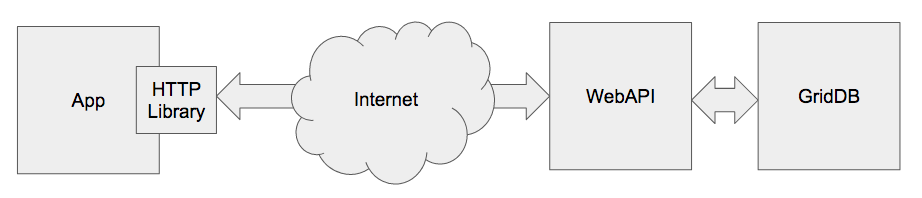
The GridDB WebAPI is a Java service that allows developers to query and write to GridDB with a simple HTTP REST API. It is the lightest weight, easiest method to write to or access data from GridDB across the internet without using a VPN.

In this blog post, we’re going to use the CASAS dataset as we’ve used in previous tutorials here, here and here. We’ll demonstrate all samples with CURL as its input arguments are widely known and it is available on nearly every imaginable platform.
Installation
We’ll assume you followed the quick start and already have GridDB 4.5 running.
After downloading the tarball from Github you untar it in $GS_HOME (usually /var/lib/gridstore) before setting a few configuration parameters.
$ sudo su - gsadm
$ cd $GS_HOME
$ curl -o https://github.com/griddb/webapi/releases/download/2.2.0/griddb_webapi-2.2.0-bin.tar.gz
$ tar zxvf griddb_webapi-2.2.0-bin.tar.gz
Now to start the WebAPI:
$ cd webapi
$ nohup java -jar lib/griddb-webapi-ce-2.2.0.jar &
Using nohup allows the terminal to exit and not kill the server.
Inserting Data
Before you insert data, you need to create a container:
curl -X POST --basic -u admin:admin -H "Content-type:application/json" -d
    '{"container_name":"casastest", "container_type":"TIME_SERIES", "rowkey":true,
        "columns": [{"name": "dt", "type": "TIMESTAMP"},
        {"name": "sensor", "type": "STRING"} ,
        {"name": "translate01", "type": "STRING"} ,
        {"name": "translate02", "type": "STRING"} ,
        {"name": "message", "type": "STRING"} ,
        {"name": "sensoractivity", "type": "STRING"} ]}'
    http://127.0.0.1:8080/griddb/v2/defaultCluster/dbs/public/containers
As the CASAS data is stored in TSV files we’ll use GAWK to convert into JSON line by line:
$ cat csh102.rawdata.txt | gawk  '{ printf "[["%sT%sZ",   "%s", "%s",  "%s",  "%s",  "%s" ]]n", $1, $2, $3, $4, $5, $6, $7 }'  |  while read -r line ; do
    curl -X PUT --basic -u admin:admin -H "Content-type:application/json" -d  "$line"
        http://127.0.0.1:8080/griddb/v2/defaultCluster/dbs/public/containers/casastest/rows
done
{"count":1}{"count":1}{"count":1}{"count":1}{"count":1}{"count":1}{"count":1}{"count":1}{"count":1}{"count":1}
It also very easy todo bulk loads with the WebAPI with slightly more complicated AWK to insert commas between records:
$ cat rawdata.txt | gawk  'BEGIN { printf "[" }  { printf "%s["%sT%sZ",   "%s", "%s",  "%s",  "%s",  "%s" ]n", comma, $1, $2, $3, $4, $5, $6, $7 }  { comma = "," } END { printf "]" } ' | curl -X PUT --basic -u admin:admin -H "Content-type:application/json" --data-binary @-
        http://127.0.0.1:8080/griddb/v2/defaultCluster/dbs/public/containers/casastest/rows
{"count":10}
Retrieving Data
SQL
One of the features added in version 2.2 of the WebAPI was SQL support. Taking one of the more complex queries from the CASAS tutorial series shows how the WebAPI can deliver powerful analysis within a simple framework:
STATEMENT=""

$ curl -X POST --basic -u admin:admin -H "Content-type:application/json" -d
        " [{ "type": "sql-select", "stmt": "select TO_EPOCH_MS(dt)/1000 as start, TO_EPOCH_MS((select min(dt) from csh102_M001 where dt > a.dt   and message = 'OFF'  ))/1000, TIMESTAMPDIFF(SECOND, (select min(dt) from csh102_M001 where dt > a.dt  and message = 'OFF' ), a.dt ) from csh102_M001 as a where a.message = 'ON' order by a.dt asc" } ] "
 http://127.0.0.1:8080/griddb/v2/defaultCluster/dbs/public/sql
[{"columns":[{"name":"start","type":"LONG"},{"name":"aggregationResult","type":"LONG"},{"name":"aggregationResult","type":"LONG"}],"results":[[1309416476,1309416501,24],[1309416486,1309416501,14],[1309416523,1309416563,39],[1309416914,1309416979,65],[1309417234,1309417337,102],[1309417234,1309417337,102],[1309417277,1309417337,59],[1309423242,1309423637,394],[1309441618,1309441659,40],[1309441648,1309441659,10],[1309441978,null,null]]}][owen@hpelnxdev webapi_blog]$
Running over SSL
The Community Edition version of the GridDB WebAPI doesn’t support SSL connections, but a reverse proxy with NGINX quickly solves that.
$ sudo yum -y install nginx opensslIf you do not already have a signed certificate/key pair, we can generate a key and a self signed certificate,
$ sudo openssl req -x509 -nodes -days 365 -newkey rsa:2048 -keyout tls.key -out tls.crtThen create the NGINX configuration, sslproxy.conf:
user nginx;
worker_processes auto;
pid /run/nginx.pid;

events {
    worker_connections 1024;
}

http {
    server {
        listen              10443 ssl;
        ssl_certificate     tls.crt;
        ssl_certificate_key tls.key;
        location / {
            proxy_pass http://127.0.0.1:8080/;
         }
    }
}
And finally start NGINX:
$ sudo nginx -c /path/to/sslproxy.confNow you can fetch test the SSL proxy by fetching records with curl over SSL. The -k flag is required if the certificate is self signed.
$ curl -X POST --basic -u admin:admin -H "Content-type:application/json" -d
        ' [{ "name": "casastest", "stmt": "select * limit 100", "columns": null} ] '
 -k https://127.0.0.1:10443/griddb/v2/defaultCluster/dbs/public/tql
[{"columns":[{"name":"dt","type":"TIMESTAMP"},{"name":"sensor","type":"STRING"},{"name":"translate01","type":"STRING"},{"name":"translate02","type":"STRING"},{"name":"message","type":"STRING"},{"name":"sensoractivity","type":"STRING"}],"results":[["2012-07-18T12:56:51.257Z","D001","Ignore","Ignore","CLOSE","Control4-Door"],["2012-07-18T12:58:01.564Z","D002","OutsideDoor","FrontDoor","OPEN","Control4-Door"],["2012-07-18T12:58:52.825Z","T102","Ignore","FrontDoorTemp","78","Control4-Temperature"],["2012-07-18T12:59:47.398Z","BATP102","Ignore","Ignore","85","Control4-BatteryPercent"],["2012-07-18T13:01:24.416Z","T103","Ignore","BathroomTemp","25","Control4-Temperature"],["2012-07-18T13:02:37.391Z","BATP103","Ignore","Ignore","82","Control4-BatteryPercent"],["2012-07-18T13:04:51.580Z","T101","Ignore","Ignore","31","Control4-Temperature"],["2012-07-18T13:06:07.577Z","MA016","Kitchen","Kitchen","OFF","Control4-MotionArea"],["2012-07-18T13:06:48.461Z","D003","Bathroom","BathroomDoor","OPEN","Control4-Door"],["2012-07-18T13:07:32.498Z","M009","Bedroom","Bedroom","ON","Control4-Motion"]],"offset":0,"limit":100,"total":10}]
If you have any questions about the blog, please create a Stack Overflow post here https://stackoverflow.com/questions/ask?tags=griddb .
Make sure that you use the “griddb” tag so our engineers can quickly reply to your questions.