import os
import pandas as pd
import numpy as np
from IPython.display import Image
import jaydebeapi
import urllib.parse
import sys
import matplotlib.pyplot as plt
import seaborn as sns
import time
from tabulate import tabulate
import plotly.express as px
import plotly.figure_factory as ff
os.chdir("XX") #Put in your working directory here
About the Dataset
For this analysis, we use the dataset related to Global Power Plants. The 'Global Power Plant Database' is an extensive, open source repository of power plant information worldwide provided by the World Resources Institute (WRI). The dataset has consolidated data from around the globe, simplifying navigation and enabling analysis. It encompasses about 35,000 power plants in 167 countries, encompassing both conventional thermal plants (e.g., coal, gas, nuclear) and renewable energy sources (e.g., hydro, wind, solar). Each entry includes precise geographic location, details on capacity, energy generation, ownership, and the type of fuel used. The database is regularly updated with the latest data, ensuring its ongoing relevance and usefulness.
The dataset can be downloaded from the official website of World Resources Institute using the URL - https://datasets.wri.org/dataset/globalpowerplantdatabase.
##Specify the path to your image file
image_path = 'About the Dataset.png'
width = 500
## Display the image
Image(filename=image_path, width=width)

Download the dataset 'Global Power Plant Database v1.3.0'. If a newer version is available in the dataset, download the newer version of the dataset using the 'Download' button. A compressed folder named 'global_power_plant_database_v_1_3.zip' gets downloaded which can then be unzipped. To unzip the folder, you can typically right-click on the downloaded file and choose an option like "Extract" or "Unzip." Once the folder is extracted, you will have access to the dataset and its contents.
Reading the Data file into a dataframe
# Get the current working directory
current_directory = os.getcwd()
# Specify the folder name you want to concatenate
folder_name = 'global_power_plant_database_v_1_3'
# Join the current directory with the folder name
full_path = os.path.join(current_directory, folder_name)
Global_Powerplant = pd.read_csv(os.path.join(full_path,"global_power_plant_database.csv"))
C:\Users\mg_su\AppData\Local\Temp/ipykernel_2192/3565249191.py:10: DtypeWarning: Columns (10) have mixed types. Specify dtype option on import or set low_memory=False. Global_Powerplant = pd.read_csv(os.path.join(full_path,"global_power_plant_database.csv"))
About GridDB
GridDB is a distributed, in-memory NoSQL database that offers several advantages for analyzing datasets like the Global Power Plant Database:
High Performance: GridDB is an in-memory database, which means it can handle data with extremely low latency. This is essential for real-time analysis of large datasets, such as monitoring and analyzing power plant data as it's generated.
Scalability: GridDB is designed for scalability. It can handle large volumes of data and can be easily scaled out horizontally to accommodate data growth and increased analysis demands. As the Global Power Plant Database is continuously updated, having a scalable database is crucial.
NoSQL Data Model: NoSQL databases like GridDB are schema-less and flexible, making it easier to handle diverse and evolving datasets like the Global Power Plant Database. You can store and query data without the constraints of a fixed schema.
Geospatial Data Support: GridDB supports geospatial data types and queries. Given that power plant data often includes geographic information, this feature is essential for location-based analysis and mapping.
High Availability: GridDB offers features for high availability and fault tolerance. Ensuring data availability and minimizing downtime is crucial for analyzing and monitoring power plant data.
Complex Query Support: GridDB allows you to perform complex queries, filtering, and aggregation. This is important for extracting insights from the dataset and performing detailed analysis.
Real-time Analytics: GridDB's in-memory architecture and real-time capabilities make it suitable for real-time analytics and decision-making. It's well-suited for monitoring power plant operations and reacting to events in real time.
Time-Series Data: Power plant data often includes time-series information, such as energy generation over time. GridDB is capable of efficiently handling time-series data, which is essential for analyzing historical trends and patterns.
API Support: GridDB provides APIs for various programming languages, making it accessible and compatible with a wide range of analytical tools and platforms.
Data Integration: GridDB can integrate with other data analysis tools, allowing you to connect it to your preferred data analytics and visualization tools for deeper insights.
Loading the dataset into GridDB
We load the data from the Python DataFrame onto GridDB. There are a number of ways to load data into GridDB and query the data -
- There are three options to connect to GridDB -
Establishing the connection to GridDB using JayDeBe API
A short note on the JayDeBeAPI
The JayDeBeApi is a Python module that enables connecting to databases that support the Java Database Connectivity (JDBC) standard. It acts as a bridge between Python and the database using JDBC, allowing users to interact with standalone and cloud databases. In this article, we use the GridDB Cloud environment which is currently only available in Japan but it will be available globally in the near-future. Refer to the GridDB cloud documentation for more information.
Downloading drivers for JayDeBe API
The JayDeBeApi library requires the JDBC driver specific to the database you want to connect to. In the case of GridDB, you should have the GridDB JDBC driver (gridstore-jdbc.jar) installed.
Here are the steps to do so -
- Download the GridDB JDBC drivers from the GridDB Cloud portal by accessing the 'Supports' page on the Cloud portal and scrolling down to the "GridDB Cloud Library and Plugin download" section.
- Note that the file downloaded is a zip archive. On extracting it, the JDBC driver files can be found within the JDBC folder. Below is a screenshot of the 'Downloads' section in the GridDB Cloud Portal -
- The GridDB JDBC driver files to be downloaded are -
- gridstore-5.2.0.jar
- gridstore-jdbc-5.2.0.jar
- gridstore-advanced-5.2.0.jar
- Save the jar files in the same folder location and in a location accessible by your Python environment.
- Add the location of the jar files to the CLASSPATH system environment variable.
- To do this on a Windows machine, access the 'Environment Variables' from the 'Control Panel'.
- Under the 'System Variables', create a new variable called 'CLASSPATH' and mention the locations of the 3 jar files.
- Install the JayDeBeApi Python package in your Python environment.
- You are now ready to connect to the GridDB database from Python. Once the connection is established, you can execute SQL queries and perform DML database operations using the JayDeBeApi connection object.
- It is important to note that the drivers for GridDB Cloud are different from GridDB OSS.
- Ensure that the SSL Mode is set to 'sslMode=PREFERRED'. If this doesn't work, try with '&sslMode=VERIFY'. Ensure that the connectionRoute is set to PUBLIC.
Help with Error Codes
If you get an error at any point, here is a list of error codes to get more context around the error - GridDB Error Codes.
Notification Provider Method
We will use the GridDB notification provider method to connect to GridDB. First, make a note of the notificationProvider, the GridDB cluster name, the GridDB database name and the username/password to access the database. These values will be used to construct the connection string and establish the connection to GridDB.
Environment Variable Setup
One important consideration is that JayDeBeApi relies on Java. Specifically, it necessitates the presence of a JAVA_HOME environment variable, which should correctly reference the installation location of the Java JRE (Java Runtime Environment). To ensure a smooth operation, it is crucial to confirm that the JAVA_HOME environment variable is set up and that it points to the designated JRE location.
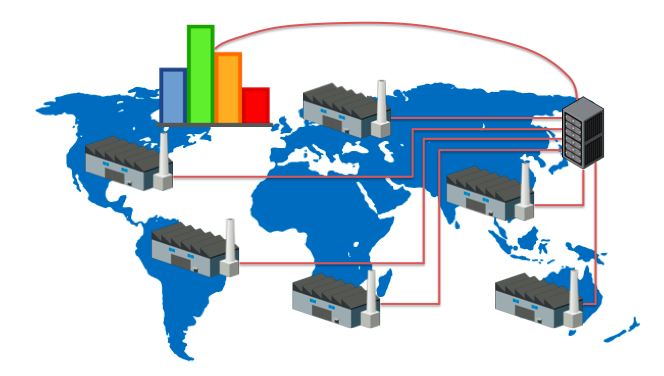
Schematic representing the dataflow from the Data Portal through Python to GriDB
Establishing the connection to GridDB
notification_provider = "https://dbaasshareextconsta.blob.core.windows.net/dbaas-share-extcon-blob/trial1602.json?sv=2015-04-05&sr=b&st=2023-03-14T00%3A00%3A00.0000000Z&se=2073-03-14T00%3A00%3A00.0000000Z&sp=r&sig=h2VJ0xAqsnRsqWV5CAS66RifPIZ1PDCJ0x%2FiXb2FOhA%3D"
np_encode = urllib.parse.quote(notification_provider)
cluster_name = "XX" ## Specify the cluster name here
cn_encode = urllib.parse.quote(cluster_name)
database_name = "XX" ## Specify the database name here
dbn_encode = urllib.parse.quote(database_name)
sslMode = "&sslMode=PREFERRED" #sslMode should be PREFERRED and connectionRoute should be PUBLIC
sm_encode = urllib.parse.quote(sslMode)
username = 'XX'
password = 'XX'
#Construct the JDBC URL to be used to connect to the GridDB database. The format is -
# jdbc:gs:///clusterName/databaseName?notificationProvider=theNotificationProviderURL&sslMode=PREFERRED
url = "jdbc:gs:///" + cn_encode + "/" + dbn_encode + "?notificationProvider=" + np_encode + sm_encode
#print("JDBC URL is " + url)
conn = jaydebeapi.connect("com.toshiba.mwcloud.gs.sql.Driver",
url,
{'user': username, 'password': password,
'connectionRoute':'PUBLIC',
'loginTimeout': '20'}
, "gridstore-jdbc-5.2.0.jar") #ensure to provide the correct location of the gridstore-jdbc JAR library
print('success!')
success!
Creating Containers in GridDB
A short note on Containers in GridDB (and key differences from Tables)
Being a No-SQL database, GridDB stores data in containers. Containers are logical structures for storing and managing data. They are similar to tables in a relational database but have some key differences. Tables in a traditional relational database and containers in GridDB serve as data storage structures, but they have key differences due to the distinct data models and design principles of each database system. Here are some key differences between tables and containers:
1. Data Model:
Tables (Relational Databases): Tables in relational databases enforce a strict, predefined schema for data. Data must conform to the table's structure, which consists of columns with defined data types.
Containers (GridDB): Containers in GridDB are schema-less. They do not enforce a fixed schema, allowing for flexibility in the type and structure of the data they can store. Data within a container can be heterogeneous.
2. Query Language:
Tables (Relational Databases): Relational databases typically use SQL (Structured Query Language) for querying data. SQL provides powerful querying capabilities for structured data.
Containers (GridDB): GridDB often uses its own query language or APIs tailored to NoSQL and in-memory data models. Queries can be different and are designed for handling semi-structured or unstructured data.
3. Data Types:
Tables (Relational Databases): Relational databases work well for structured data, supporting data types such as integers, strings, dates, and more. They may not handle complex data structures well.
Containers (GridDB): GridDB is more versatile for handling various data types, including key-value pairs, time-series data, JSON-like documents, and complex data structures. This flexibility is especially beneficial for applications dealing with semi-structured or unstructured data.
4. Scalability:
Tables (Relational Databases): Relational databases can scale vertically (adding more resources to a single server) or through replication. Scaling horizontally is possible but may be complex.
Containers (GridDB): GridDB is designed for horizontal scalability. Data is distributed across multiple nodes, providing better performance and high availability for large datasets.
5. Real-Time and Analytical Processing:
Tables (Relational Databases): Relational databases are commonly used for transactional and analytical processing, but real-time data processing may require additional technologies.
Containers (GridDB): GridDB is optimized for high-speed data processing and real-time analytics. It's well-suited for applications that require real-time processing of large volumes of data.
In summary, tables in relational databases follow a structured, fixed schema approach, while containers in GridDB are schema-less and offer flexibility in data types and structures. GridDB is designed for high-speed, real-time data processing and provides scalability benefits.
We now go ahead and create the container in GridDB to enable storing the global power plant data.
Determining Datatypes for columns in the GridDB Container
As a NoSQL in-memory database, GridDB supports a range of data types to accommodate various types of data and use cases. It is very important to determine the correct datatypes for columns, especially for the numeric columns. This will prevent arithmetic overflow and type conversion errors. To determine the right datatype, we need to look at the maximum and minimum of each column and compare it with GridDB datatype limits. Refer to this GridDB resource for more details.
Function to get the minimum and maximum limits of numeric and float datatypes
def print_limits(data_type, min_value, max_value):
print(f"{data_type}: From: {min_value} To: {max_value}")
# Integer datatypes
print_limits('BYTE', -2**7, 2**7 - 1)
print_limits('SHORT', -2**15, 2**15 - 1)
print_limits('INTEGER', -2**31, 2**31 - 1)
print_limits('LONG', -2**63, 2**63 - 1)
# Floating-point datatypes
print_limits('FLOAT', -3.4028235e38, 3.4028235e38)
print_limits('DOUBLE', -1.7976931348623157e308, 1.7976931348623157e308)
BYTE: From: -128 To: 127 SHORT: From: -32768 To: 32767 INTEGER: From: -2147483648 To: 2147483647 LONG: From: -9223372036854775808 To: 9223372036854775807 FLOAT: From: -3.4028235e+38 To: 3.4028235e+38 DOUBLE: From: -1.7976931348623157e+308 To: 1.7976931348623157e+308
Data Cleaning
The columns were analyzed and the maximum value of numeric values were identified. The maximum length of each non-numeric column was also noted down.
- The following non-numeric columns have missing values:
- other_fuel1
- other_fuel2
- other_fuel3
- commissioning_year
- owner
- geolocaton_source
- source
- generation_data_source
- estimated_generation_note_2013
- estimated_generation_note_2014
- estimated_generation_note_2015
- estimated_generation_note_2016
- estimated_generation_note_2017
- country
- country_long
- name
- gppd_idnr
- The following numeric columns have missing values:
- year_of_capacity_data
- generation_gwh_2013
- generation_gwh_2014
- generation_gwh_2015
- generation_gwh_2016
- generation_gwh_2017
- generation_gwh_2018
- generation_gwh_2019
- generation_data_source
- estimated_generation_gwh_2013
- estimated_generation_gwh_2014
- estimated_generation_gwh_2015
- estimated_generation_gwh_2016
- estimated_generation_gwh_2017
- The following columns are not required for our analysis and hence will need to be removed from the dataframe:
- wepp_id
- url
- The column 'commissioning_year' and 'year_of_capacity_data' has decimals in the 'year' values and needs to be cleaned.
# Remove one or more columns
columns_to_remove = ['wepp_id', 'url'] # List of columns to remove
Global_Powerplant = Global_Powerplant.drop(columns=columns_to_remove)
#Impute missing values for the non-numeric columns (Fill Nas with an empty string)
Global_Powerplant['primary_fuel'].fillna('',inplace=True)
Global_Powerplant['other_fuel1'].fillna('',inplace=True)
Global_Powerplant['other_fuel2'].fillna('',inplace=True)
Global_Powerplant['other_fuel3'].fillna('',inplace=True)
#Global_Powerplant['commissioning_year'].fillna('',inplace=True)
Global_Powerplant['owner'].fillna('',inplace=True)
Global_Powerplant['geolocation_source'].fillna('',inplace=True)
Global_Powerplant['source'].fillna('',inplace=True)
Global_Powerplant['generation_data_source'].fillna('',inplace=True)
Global_Powerplant['estimated_generation_note_2013'].fillna('',inplace=True)
Global_Powerplant['estimated_generation_note_2014'].fillna('',inplace=True)
Global_Powerplant['estimated_generation_note_2015'].fillna('',inplace=True)
Global_Powerplant['estimated_generation_note_2016'].fillna('',inplace=True)
Global_Powerplant['estimated_generation_note_2017'].fillna('',inplace=True)
Global_Powerplant['country'].fillna('',inplace=True)
Global_Powerplant['country_long'].fillna('',inplace=True)
Global_Powerplant['name'].fillna('',inplace=True)
Global_Powerplant['gppd_idnr'].fillna('',inplace=True)
#Convert float values to int
#Global_Powerplant['commissioning_year'] = Global_Powerplant['commissioning_year'].astype(int)
#Impute missing values for the numeric column 'commissioning_year'
# Calculate the mean of the 'commissioning_year' column
mean_value = Global_Powerplant['commissioning_year'].mean()
# Impute missing values with the mean
Global_Powerplant['commissioning_year'].fillna(mean_value, inplace=True)
#Impute missing values for the numeric column 'year_of_capacity_data'
# Calculate the mean of the 'year_of_capacity_data' column
#Global_Powerplant['year_of_capacity_data'] = Global_Powerplant['year_of_capacity_data'].astype(int)
mean_value = Global_Powerplant['year_of_capacity_data'].mean()
# Impute missing values with the mean
Global_Powerplant['year_of_capacity_data'].fillna(mean_value, inplace=True)
# Remove decimal portion by casting to integers
Global_Powerplant.loc[:, 'generation_gwh_2013'] = Global_Powerplant['generation_gwh_2013'].fillna(0).astype(float)
Global_Powerplant.loc[:, 'generation_gwh_2014'] = Global_Powerplant['generation_gwh_2014'].fillna(0).astype(float)
Global_Powerplant.loc[:, 'generation_gwh_2015'] = Global_Powerplant['generation_gwh_2015'].fillna(0).astype(float)
Global_Powerplant.loc[:, 'generation_gwh_2016'] = Global_Powerplant['generation_gwh_2016'].fillna(0).astype(float)
Global_Powerplant.loc[:, 'generation_gwh_2017'] = Global_Powerplant['generation_gwh_2017'].fillna(0).astype(float)
Global_Powerplant.loc[:, 'generation_gwh_2018'] = Global_Powerplant['generation_gwh_2018'].fillna(0).astype(float)
Global_Powerplant.loc[:, 'generation_gwh_2019'] = Global_Powerplant['generation_gwh_2019'].fillna(0).astype(float)
Global_Powerplant.loc[:, 'estimated_generation_gwh_2013'] = Global_Powerplant['estimated_generation_gwh_2013'].fillna(0).astype(float)
Global_Powerplant.loc[:, 'estimated_generation_gwh_2014'] = Global_Powerplant['estimated_generation_gwh_2014'].fillna(0).astype(float)
Global_Powerplant.loc[:, 'estimated_generation_gwh_2015'] = Global_Powerplant['estimated_generation_gwh_2015'].fillna(0).astype(float)
#Convert the years back to an integer
Global_Powerplant.loc[:, 'commissioning_year'] = Global_Powerplant['commissioning_year'].astype(int)
Global_Powerplant.loc[:, 'year_of_capacity_data'] = Global_Powerplant['year_of_capacity_data'].astype(int)
#Fill missing fields; convert the type to string
Global_Powerplant['generation_data_source'].fillna('',inplace=True)
Global_Powerplant.loc[:, 'commissioning_year'] = Global_Powerplant['commissioning_year'].astype(str)
Global_Powerplant.loc[:, 'year_of_capacity_data'] = Global_Powerplant['year_of_capacity_data'].astype(str)
Subsetting the data to the Top 5 largest economies
For the purpose of this analysis, we subset are data to have only the top 5 largest economies namely the United States of America, China, Japan, Germany and India.
top_5_economies = ['CHN', 'DEU', 'IND', 'JPN', 'USA']
Global_Powerplant_subset = Global_Powerplant[Global_Powerplant['country'].isin(top_5_economies)]
Datatype and Maximum Length for all columns
While using the JayDeBeAPI, we can use GridDB's SQL like syntax and run CREATE TABLE statements. GridDB supports standard DDL and DML operations in its SQL feature in addition to TQL. Refer to this GridDB SQL Reference to know more.
sql_query1 = (f"""
CREATE TABLE global_powerplants
(
country VARCHAR(3),
country_long VARCHAR(60),
name VARCHAR(100),
gppd_idnr VARCHAR(15),
capacity_mw FLOAT,
latitude FLOAT,
longitude FLOAT,
primary_fuel VARCHAR(15),
other_fuel1 VARCHAR(15),
other_fuel2 VARCHAR(10),
other_fuel3 VARCHAR(15),
commissioning_year varchar(4),
owner VARCHAR(255),
source VARCHAR(255),
geolocation_source VARCHAR(100),
year_of_capacity_data varchar(4),
generation_gwh_2013 FLOAT,
generation_gwh_2014 FLOAT,
generation_gwh_2015 FLOAT,
generation_gwh_2016 FLOAT,
generation_gwh_2017 FLOAT,
generation_gwh_2018 FLOAT,
generation_gwh_2019 FLOAT,
generation_data_source VARCHAR(80),
estimated_generation_gwh_2013 FLOAT,
estimated_generation_gwh_2014 FLOAT,
estimated_generation_gwh_2015 FLOAT,
estimated_generation_gwh_2016 FLOAT,
estimated_generation_gwh_2017 FLOAT,
estimated_generation_note_2013 VARCHAR(15),
estimated_generation_note_2014 VARCHAR(15),
estimated_generation_note_2015 VARCHAR(15),
estimated_generation_note_2016 VARCHAR(15),
estimated_generation_note_2017 VARCHAR(15)
)
""")
with conn.cursor() as cursor:
cursor.execute(sql_query1)
Row Registration in GridDB
Here, we use the 'INSERT SQL' command in GridDB to insert rows into GridDB while iterating through each row of the pandas dataframe 'Global_Powerplant'. Each row is taken in as a tuple and loaded into the container 'global_powerplants' in GridDB Cloud.
# Prepare the SQL statement for insertion
sql_query2 = "INSERT INTO global_powerplants (country,country_long,name,gppd_idnr,capacity_mw,latitude, longitude, primary_fuel, other_fuel1, other_fuel2,other_fuel3, commissioning_year, owner, source,geolocation_source, year_of_capacity_data, generation_gwh_2013,generation_gwh_2014, generation_gwh_2015,generation_gwh_2016,generation_gwh_2017,generation_gwh_2018,generation_gwh_2019,generation_data_source,estimated_generation_gwh_2013,estimated_generation_gwh_2014,estimated_generation_gwh_2015,estimated_generation_gwh_2016,estimated_generation_gwh_2017,estimated_generation_note_2013,estimated_generation_note_2014,estimated_generation_note_2015,estimated_generation_note_2016,estimated_generation_note_2017) VALUES (?,?,?,?,?,?,?,?,?,?,?,?,?,?,?,?,?,?,?,?,?,?,?,?,?,?,?,?,?,?,?,?,?,?)"
# Create a list of tuples containing the data to be inserted
data_to_insert = [tuple(row) for _, row in Global_Powerplant_subset.iterrows()]
# Use a loop to insert each row of data and record the time taken
cursor = conn.cursor()
try:
start_time = time.time() # Record the start time
for row in data_to_insert:
#print(row)
cursor.execute(sql_query2, row)
end_time = time.time() # Record the end time
execution_time = end_time - start_time
print(f"Time taken for insertion: {execution_time:.6f} seconds")
except Exception as e:
# Handle any exceptions that may occur during execution
print("Error:", e)
# Commit the changes
conn.commit()
Time taken for insertion: 7200.702984 seconds
Data Analysis using GridDB
Which countries have some of the oldest commissioning year?
sql_query3 = '''SELECT country,commissioning_year, count(name) as cnt_powerplants
FROM global_powerplants
GROUP BY 1,2
ORDER BY 2 ASC
'''
# Create a cursor to execute the query
cursor = conn.cursor()
# Execute the query
cursor.execute(sql_query3)
# Fetch the column names
column_names = [desc[0] for desc in cursor.description]
# Fetch the query results
results = cursor.fetchall()
# Convert the results to a Pandas DataFrame
Oldest_powerplants = pd.DataFrame(results, columns=column_names)
# Sort the DataFrame in descending order based on 'cnt_powerplants'
Oldest_powerplants = Oldest_powerplants.sort_values(by='cnt_powerplants', ascending=False)
# Close the cursor and connection
cursor.close()
# Define the start and end years
start_year = 1895
end_year = 2020
# Define the number of bins
num_bins = 10
# Create custom bins with equal-width intervals
custom_bins = np.linspace(start_year, end_year, num_bins)
# Round the bin edges to the nearest integer
custom_bins = np.round(custom_bins).astype(int)
type(Oldest_powerplants['commissioning_year'])
# Round the bin edges to the nearest integer
Oldest_powerplants['commissioning_year'] = Oldest_powerplants['commissioning_year'].astype(int)
# Sort the DataFrame in descending order based on 'cnt_powerplants'
Oldest_powerplants = Oldest_powerplants.sort_values(by='cnt_powerplants', ascending=False)
# Define custom bin edges and labels
custom_bins = [1895, 1905, 1915, 1925, 1935, 1945, 1955, 1965, 1975, 1985, 1995, 2005, 2015, 2020]
# Create a new column 'commissioning_year_bin' based on custom bins
Oldest_powerplants['commissioning_year_bin'] = pd.cut(
Oldest_powerplants['commissioning_year'],
bins=custom_bins,
labels=[f"{start}-{end}" for start, end in zip(custom_bins, custom_bins[1:])]
)
# Define a custom color scale with a specific order
color_scale = px.colors.qualitative.Set1[:len(custom_bins) - 1][::-1]
# Create the histogram with the sorted legend and custom color scale
fig = px.histogram(Oldest_powerplants, x="country", y="cnt_powerplants",
color='commissioning_year_bin',
height=400,
color_discrete_map=dict(zip(Oldest_powerplants['commissioning_year_bin'].unique(), color_scale)))
fig.show()
Insight(s): It is clear that almost all countries had several powerplants commissioned between 1995 and 2005. China seems to have 3426 powerplants installed between 1995 and 2005. USA had most powerplants commissioned between 2005 and 2020. USA has the most number of powerplants followed by China. India comes 3rd followed by Germany (DEU) and Japan.
What does the geographical distribution of the powerplants look like?
sql_query4 = '''SELECT country_long,latitude,longitude,primary_fuel, count(name) as cnt_powerplants
FROM global_powerplants
GROUP BY 1,2,3,4
ORDER BY 2 ASC
'''
# Create a cursor to execute the query
cursor = conn.cursor()
# Execute the query
cursor.execute(sql_query4)
# Fetch the column names
column_names = [desc[0] for desc in cursor.description]
# Fetch the query results
results = cursor.fetchall()
# Convert the results to a Pandas DataFrame
Geo_Location_powerplants = pd.DataFrame(results, columns=column_names)
# Sort the DataFrame in descending order based on 'cnt_powerplants'
Geo_Location_powerplants = Geo_Location_powerplants.sort_values(by='cnt_powerplants', ascending=False)
# Close the cursor and connection
cursor.close()
fig = px.scatter_geo(
Geo_Location_powerplants,
lon='longitude',
lat='latitude',
color='primary_fuel',
size='cnt_powerplants',
projection="natural earth", # Adjust the projection as needed
title="Power Plant Locations",
hover_name="country_long",
template="plotly" # You can choose a different template if desired
)
fig.update_geos(
showcoastlines=True,
coastlinecolor="Black",
showland=True,
landcolor="white",
showocean=True,
oceancolor="LightBlue",
)
fig.show()
Insight(s): Looking at the Geographical Distribution, we see that much of the USA has powerplants that use oil and petcoke as their primary fuel. Much of India and China have a distribution of Coal Powerplants and Hydro powerplants (Click on 'Coal' in the color legend to see the distribution of hydro powerplants). India seems to have a good number of biomass and nuclear powerplants along its west coast. China also has a vast distribution of gas based powerplants. Germany seems to use a combination of fuels in its powerplants (hybrid powerplants).
What are the primary fuels used across all powerplants?
sql_query5 = '''SELECT primary_fuel, count(name) as cnt_powerplants
FROM global_powerplants
GROUP BY 1
ORDER BY 2 ASC
'''
# Create a cursor to execute the query
cursor = conn.cursor()
# Execute the query
cursor.execute(sql_query5)
# Fetch the column names
column_names = [desc[0] for desc in cursor.description]
# Fetch the query results
results = cursor.fetchall()
# Convert the results to a Pandas DataFrame
Primary_fuels = pd.DataFrame(results, columns=column_names)
# Sort the DataFrame in descending order based on 'cnt_powerplants'
Primary_fuels = Primary_fuels.sort_values(by='cnt_powerplants', ascending=False)
# Close the cursor and connection
cursor.close()
fig = px.bar(Primary_fuels, x='primary_fuel', y='cnt_powerplants',text_auto=True)
fig.show()
Insight(s): Most powerplants across the world seem to be Solar powerplants followed by Hydro plants. It's interesting to find some powerplants that you 'wastes' as a primary fuel.
What are the combination of fuels used in Powerplants?
sql_query6 = '''
SELECT DISTINCT
primary_fuel,
other_fuel1 || '-' || other_fuel2 || '-'|| other_fuel3 as combination_fuels,
COUNT(name) as cnt_powerplants
FROM global_powerplants
WHERE primary_fuel !='' AND (other_fuel1 || '-' || other_fuel2 || '-'|| other_fuel3) !='--'
GROUP BY primary_fuel
ORDER BY primary_fuel ASC;
'''
# Create a cursor to execute the query
cursor = conn.cursor()
# Execute the query
cursor.execute(sql_query6)
# Fetch the column names
column_names = [desc[0] for desc in cursor.description]
# Fetch the query results
results = cursor.fetchall()
# Convert the results to a Pandas DataFrame
Combination_fuels = pd.DataFrame(results, columns=column_names)
# Sort the DataFrame in descending order based on 'cnt_powerplants'
Combination_fuels = Combination_fuels.sort_values(by='cnt_powerplants', ascending=False)
Combination_fuels['combination_fuels'] = Combination_fuels['combination_fuels'].str.replace('--', '')
# Close the cursor and connection
cursor.close()
fig = ff.create_table(Combination_fuels)
fig.show()
Insight(s): Most powerplants that use 'Gas' as their primary fuel use oil as a combination fuel. There are 727 such powerplants around the world with a Gas-oil combination. The same is true of Coal powerplants. It it interesting to note that Hydro plants and Nuclear plants use oil as a combination fuel and Waste plants require gas and biomass as combination fuels.
What is the generation (in GWH) trend of the top 5 powerplants by capacity?
Here, we only consider powerplants that had both a high capacity and that had a generation atleast in one of the years between 2013 and 2019.
sql_query7 = '''SELECT
country_long,
powerplant,
capacity_mw2,
generation_gwh_2013,
generation_gwh_2014,
generation_gwh_2015,
generation_gwh_2016,
generation_gwh_2017,
generation_gwh_2018,
generation_gwh_2019
FROM
(
SELECT name as powerplant,
capacity_mw as capacity_mw2, *
FROM global_powerplants
WHERE generation_gwh_2013 > 0
OR generation_gwh_2014 > 0
OR generation_gwh_2015 >0
OR generation_gwh_2016 >0
OR generation_gwh_2017 >0
OR generation_gwh_2018 >0
OR generation_gwh_2019 >0
ORDER BY 2 desc
) top_powerplants
LIMIT 5;
'''
# Create a cursor to execute the query
cursor = conn.cursor()
# Execute the query
cursor.execute(sql_query7)
# Fetch the column names
column_names = [desc[0] for desc in cursor.description]
# Fetch the query results
results = cursor.fetchall()
# Convert the results to a Pandas DataFrame
Top_Powerplants = pd.DataFrame(results, columns=column_names)
# Close the cursor and connection
cursor.close()
# Filter columns that start with 'generation'
generation_columns = [col for col in Top_Powerplants.columns if col.startswith('generation')]
# Melt the DataFrame to have 'year' and 'value' columns
df_melted = Top_Powerplants.melt(id_vars=['country_long', 'powerplant'], value_vars=generation_columns,
var_name='year', value_name='generation')
# Create line plots
fig = px.line(df_melted, x='year', y='generation', color='powerplant',
labels={'generation': 'Generation (GWh)'}, title='Power Plant Generation Over the Years-Top 5 High Capacity Powerplants')
fig.show()
Insight(s): The powerplant 'MUNDRA TPP' and 'VINDH_CHAL STPS' have had a steady trend of generation in terms of Gigawatt-Hours (GWH). VINDH_CHAL STPS has had the highest generation between 2017 and 2018 (35 GWH). The VINDH_CHAL STPS and MUNDRA TPP are in India whereas the 'Grand Coulee', 'West County Energy Center' and 'Palo Verde' are in India.
What are the powerplants with the maximum capacity and which country do they belong to?
This consideres the powerplants with the highest capacity but we disregard whether or not they had generated electricity between 2013 and 2019.
sql_query8 = '''
SELECT * FROM (
SELECT country_long,
name as powerplant,
capacity_mw
FROM global_powerplants
ORDER BY 3 desc
) a
LIMIT 5;
'''
# Create a cursor to execute the query
cursor = conn.cursor()
# Execute the query
cursor.execute(sql_query8)
# Fetch the column names
column_names = [desc[0] for desc in cursor.description]
# Fetch the query results
results = cursor.fetchall()
# Convert the results to a Pandas DataFrame
Top_cap_Powerplants = pd.DataFrame(results, columns=column_names)
# Close the cursor and connection
cursor.close()
Top_Cap_Powerplant_Subset = Top_cap_Powerplants[['country_long', 'powerplant','capacity_mw']]
fig = ff.create_table(Top_Cap_Powerplant_Subset)
fig.show()
Insight(s): The Three Gorges Dam, Baihetan Dam, Xiluodu and East Hope Metals in China AND Kashiwazaki Kariwa in Japan are some of the powerplants with the highest capacity in terms of Megawatts.
Concluding Remarks
Leveraging Python and GridDB for the analysis of the Global Power Plant Database provides a powerful and efficient solution. Python's rich ecosystem of data analysis libraries, coupled with GridDB's high-performance data management capabilities, allows for seamless data processing and exploration. GridDB's ability to handle large datasets and complex queries makes it an ideal choice for analyzing a global dataset of power plants. The combination of Python and GridDB enables geospatial analysis of power plant data. This allows for the mapping of power plant locations and the identification of regional trends and patterns in energy generation. By using Python and GridDB for analysis, organizations and researchers can make data-driven decisions related to energy planning, environmental impact assessment, and policy formulation. The insights gained from the analysis can greatly influence the global energy landscape and aid impactful decision-making.
If you have any questions about the blog, please create a Stack Overflow post here https://stackoverflow.com/questions/ask?tags=griddb .
Make sure that you use the “griddb” tag so our engineers can quickly reply to your questions.